Week 5 課堂作業
作業一

點擊交換translate/rotate順序, 交換旋轉的物件
旋轉物件為視角畫面:


旋轉物件為畫面內物體:


作業二
旋轉茶壺:

作業三
Buffer?
緩衝區為繪圖時的遮罩區,用來避免繪圖時的重疊問題
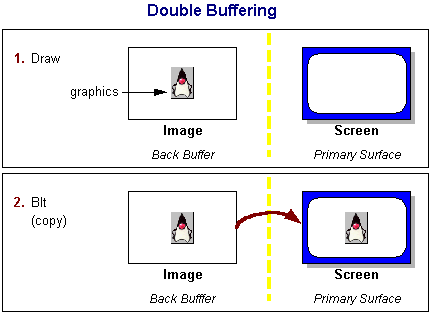
Double Buffer?
雙緩衝區為使用兩個畫面,顯示前一畫面然後繪圖在另一畫面讓電腦讀取
作業四
X,Y 旋轉

#include<GL/glut.h>
float rX=0,rY=0;
void display()
{
glClearColor(1,1,1,1);
glClear(GL_COLOR_BUFFER_BIT);
glPushMatrix();
glRotatef(rY,1,0,0);
glRotatef(rX,0,1,0);
glColor3f(1,0,0);
glutSolidTeapot(0.3);
glPopMatrix();
glutSwapBuffers();
}
void motion(int x, int y)
{
rX=x;
rY=y;
display();
}
int main(int argc, char**argv)
{
glutInit(&argc, argv);
glutInitDisplayMode(GLUT_DOUBLE|GLUT_DEPTH);
glutCreateWindow("PIGUDADA");
glutDisplayFunc(display);
glutMotionFunc(motion);
glutMainLoop();
}
Push Pop
為堆疊的應用方式,Push 為加入資料,Pop 為刪除資料
Matrix
Matrix為矩陣,也應用至變形。繪圖中用來變更rotate()、scale()、translate()的值

沒有留言:
張貼留言